Image by frimufilms on Freepik
When developing in Godot, sometimes you need to explore your game world freely, without being confined to a fixed player character or the editor viewport. That’s where DebugCamera3D comes in: a runtime camera that gives you full editor-style fly controls inside your game.
This script is designed to let you move, look, and navigate anywhere, all while running the game.
extends Camera3D
class_name DebugCamera3D


#region declarations
# input device config
@export var mouse_sensitivity_h: float = 0.01
@export var mouse_sensitivity_v: float = 0.01
@export var deadzone: float = 0.2

# runtime config
@export var move_speed: float = 5.0
@export var modifier_multiplier: float = 4.0
#endregion


#region overrides
func _unhandled_input(event: InputEvent) -> void:
	if Input.is_action_just_pressed("debug_camera"):
		current = not current
		set_physics_process(current)

	if not current:
		return

	if event is InputEventMouseMotion:
		var rot := Vector3.ZERO
		rot.y -= event.relative.x * mouse_sensitivity_h
		rotation.y += wrapf(rot.y, 0, deg_to_rad(360.0))
		rot.x -= event.relative.y * mouse_sensitivity_v
		rotation.x = clampf(rotation.x + rot.x, deg_to_rad(-80.0), deg_to_rad(80.0))

	if Input.is_action_just_pressed("ui_cancel"):
		Input.set_mouse_mode(Input.MOUSE_MODE_VISIBLE)

	if Input.is_action_just_pressed("ui_accept"):
		Input.set_mouse_mode(Input.MOUSE_MODE_CAPTURED)


func _physics_process(delta: float) -> void:
	var direction: Vector3 = move_axis()

	if direction == Vector3.ZERO:
		return

	var final_move_speed: float = move_speed if not Input.is_action_pressed("modifier") else move_speed * modifier_multiplier

	global_transform.origin += delta * direction * final_move_speed
#endregion


#region input
static func get_input_vector(forward_input: String, back_input: String, left_input: String, right_input: String) -> Vector2:
	var input_direction: Vector2 = Input.get_vector(left_input, right_input, forward_input, back_input)
	return input_direction


static func horizontal_input_direction(view_basis: Basis, input_direction: Vector2) -> Vector3:
	var vector3_input_direction := Vector3(input_direction.x, 0, input_direction.y)
	var result: Vector3 = (view_basis * vector3_input_direction).normalized()
	return result


static func _vertical_motion(up_input: String, down_input: String) -> float:
	return Input.get_action_strength(up_input) - Input.get_action_strength(down_input)


static func vertical_input_direction(view_basis: Basis, input_direction: float) -> Vector3:
	var vector3_input_direction := Vector3(0.0, input_direction, 0.0)
	var result: Vector3 = (view_basis * vector3_input_direction).normalized()
	return result


func move_axis() -> Vector3:
	var move_vector: Vector2 = get_input_vector("forward", "back", "left", "right")
	if move_vector.length() < deadzone: move_vector = Vector2.ZERO
	var horizontal_direction_vector: Vector3 = horizontal_input_direction(global_basis, move_vector)
	var vertical_direction_vector: Vector3 = vertical_input_direction(global_basis, _vertical_motion("up", "down"))
	return horizontal_direction_vector + vertical_direction_vector
#endregion
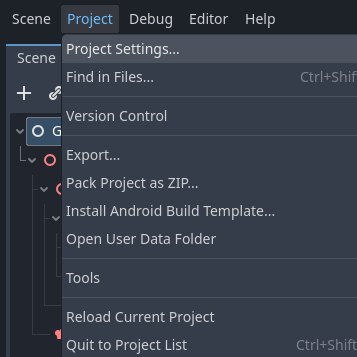
You can copy and paste it and it should work in all Godot 4.x.x versions, you just need to define the set the input actions in Project > Project Settings > Input Map and you are all set. The better option however would be to replace the input actions in the script with the ones you use in your game.
Here is a basic InputMap that should give you the same controls as the ones you use in the editor: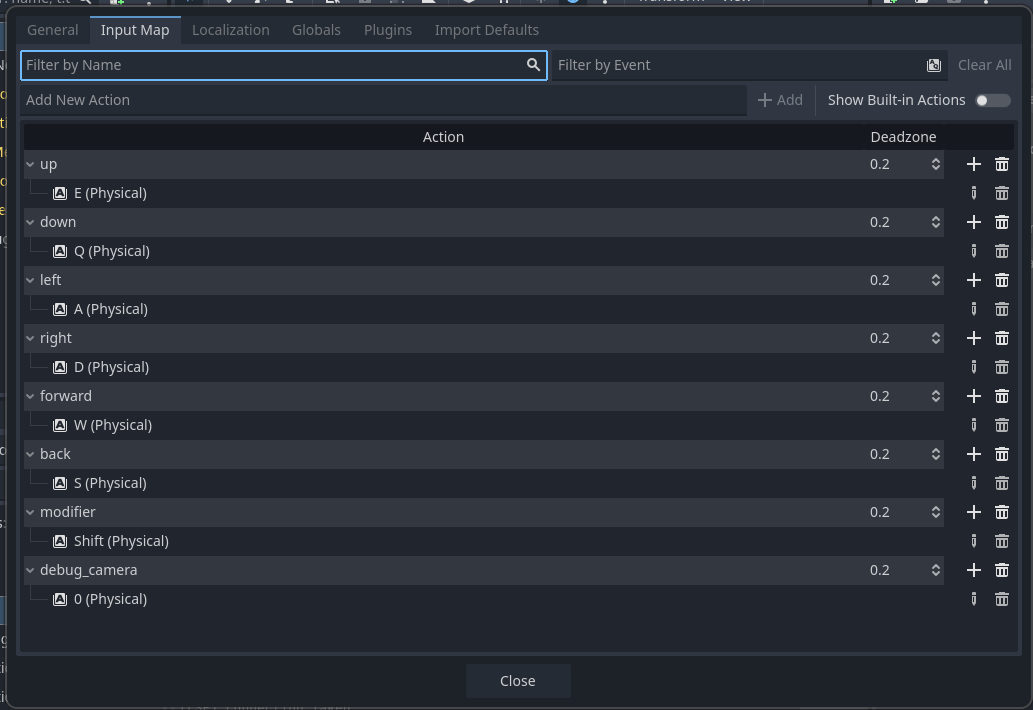
Breakdown
1. Class Setup
extends Camera3D
class_name DebugCamera3D-
extends Camera3D: The script inherits from Godot’s 3D camera node. -
class_name DebugCamera3D: Allows you to instantiate it in the editor and reference it by name in other scripts.
2. Configuration Variables
# input device config
@export var mouse_sensitivity_h: float = 0.01
@export var mouse_sensitivity_v: float = 0.01
@export var deadzone: float = 0.2

# runtime config
@export var move_speed: float = 5.0
@export var modifier_multiplier: float = 4.0-
Mouse sensitivity (
h/v): Adjust rotation speed for smooth camera movement. Smaller values feel slower and more precise. -
Deadzone: Prevents slight inputs (from keyboard sticks or minor errors) from moving the camera.
-
Move speed: Base movement speed in units per second.
-
Modifier multiplier: Multiplies speed when holding a “fast move” key (like Shift).
These variables are @export, so you can tweak them in the editor without touching the script.
3. Toggling the Camera
func _unhandled_input(event: InputEvent) -> void:
	if Input.is_action_just_pressed("debug_camera"):
		current = not current
set_physics_process(current)-
currentdetermines whether the camera is being used in the viewport. Only one camera can be current per viewport. -
Pressing the input action
"debug_camera"toggles the camera on and off. set_physics_process(current)makes it so that we only call physics_process when we are using the camera. That's where we move the camera and we only want it to move when it's active.
	if not current:
return-
Early exit: if the camera is inactive, ignore all movement or rotation input.
4. Mouse Look
	if event is InputEventMouseMotion:
		var rot := Vector3.ZERO
		rot.y -= event.relative.x * mouse_sensitivity_h
		rotation.y += wrapf(rot.y, 0, deg_to_rad(360.0))
		rot.x -= event.relative.y * mouse_sensitivity_v
		rotation.x = clampf(rotation.x + rot.x, deg_to_rad(-80.0), deg_to_rad(80.0))
How it works:
-
Reads mouse motion via
event.relative. -
Converts horizontal (
x) and vertical (y) movement into rotation. -
Yaw (
rotation.y) is wrapped to stay in 0–360° range. -
Pitch (
rotation.x) is clamped to ±80° to prevent flipping.
This lets you look freely in all directions while staying oriented.
5. Mouse Locking
	if Input.is_action_just_pressed("ui_cancel"):
		Input.set_mouse_mode(Input.MOUSE_MODE_VISIBLE)

	if Input.is_action_just_pressed("ui_accept"):
Input.set_mouse_mode(Input.MOUSE_MODE_CAPTURED)-
ui_cancel(Escape) unlocks the mouse. -
ui_accept(Enter or Space) locks the mouse to the viewport. -
Ensures smooth toggling between free camera and normal cursor.
6. Movement Mechanics
func _physics_process(delta: float) -> void:
	var direction: Vector3 = move_axis()

	if direction == Vector3.ZERO:
		return

	var final_move_speed: float = move_speed if not Input.is_action_pressed("modifier") else move_speed * modifier_multiplier

	global_transform.origin += delta * direction * final_move_speed
Explanation:
-
move_axis()Calculates movement vector (combines forward/back/left/right + up/down). -
if direction == Vector3.ZEROexit early as there is no movement. -
final_move_speedis adjusted speed if a modifier is pressed. -
finally update camera position using frame time (
delta) for smooth motion independent of frame rate.
7. Input Utilities
Horizontal Movement
static func get_input_vector(forward_input: String, back_input: String, left_input: String, right_input: String) -> Vector2:
	var input_direction: Vector2 = Input.get_vector(left_input, right_input, forward_input, back_input)
return input_direction-
Converts WASD (or arrow keys) to a 2D vector
(x = left/right, y = forward/back).
static func horizontal_input_direction(view_basis: Basis, input_direction: Vector2) -> Vector3:
	var vector3_input_direction := Vector3(input_direction.x, 0, input_direction.y)
	var result: Vector3 = (view_basis * vector3_input_direction).normalized()
return result-
Converts the Vector2 input into Vector3 world-space movement relative to camera orientation.
-
.normalized()ensures consistent speed diagonally.
Vertical Movement
static func _vertical_motion(up_input: String, down_input: String) -> float:
return Input.get_action_strength(up_input) - Input.get_action_strength(down_input)-
Returns +1 for up, -1 for down, 0 otherwise.
static func vertical_input_direction(view_basis: Basis, input_direction: float) -> Vector3:
	var vector3_input_direction := Vector3(0.0, input_direction, 0.0)
	var result: Vector3 = (view_basis * vector3_input_direction).normalized()
return result-
Converts vertical input into world-space movement.
Combining Movement
func move_axis() -> Vector3:
	var move_vector: Vector2 = get_input_vector("forward", "back", "left", "right")
	if move_vector.length() < deadzone: move_vector = Vector2.ZERO
	var horizontal_direction_vector: Vector3 = horizontal_input_direction(global_basis, move_vector)
	var vertical_direction_vector: Vector3 = vertical_input_direction(global_basis, _vertical_motion("up", "down"))
return horizontal_direction_vector + vertical_direction_vector-
Combines horizontal + vertical movement into one world-space direction vector.
-
Respects deadzone and ensures smooth flight (only useful when using joysticks or pressure sensitive keys).
Conclusion
This camera is a mini-editor in runtime, letting you move freely in 3D space so you can test physics, inspect levels, or navigate areas your player can’t normally reach.
It is not meant to be dropped in blindly and forgotten. Every project handles cameras, input, and player control differently, and this script assumes very little on purpose. In some setups, switching to this camera may not automatically disable player movement, especially if your player and debug camera share input logic or even the same Camera3D node. In those cases, you’ll want to explicitly pause player input, detach the camera, or gate movement behind a debug state.
Treat this script as a tool, not a finished feature. Adapt it to your architecture, strip what you don’t need, and wire it into your own control flow. Debug tools should bend to your project, not the other way around.
com
full time NPC, part time ByteBloomer software developer